> For the complete documentation index, see [llms.txt](https://help.claritylims.illumina.com/llms.txt). Markdown versions of documentation pages are available by appending `.md` to page URLs; this page is available as [Markdown](https://help.claritylims.illumina.com/instruments-and-integrations/novaseq-x-series/novaseqx/novaseqx-v1.3.0/novaseqx-v1.3.0-manual-upgrade.md).
# Manual Upgrade
NovaSeq X Series Integration Package v1.3.0 includes modifications to the existing NovaSeq X Series Workflows to support these [changes](/instruments-and-integrations/novaseq-x-series/novaseqx/novaseqx-v1.3.0/novaseqx-v1.3.0-release-notes.md):
1. Update existing containers (Library 2-tube Strip and Library 8-tube Strip)
2. Update global field (BP Aliquot Volume (ul))
3. Update existing automations
4. Update Load to Library Tube Strip master step global fields
5. Update AUTOMATED - Sequencing Run master step and step, including run metrics displayed
6. Update AUTOMATED - Analysis Run master step
7. Upgrade Clarity LIMS Product Analytics Integration (if enabled)
If you do not want to use the latest workflow (NovaSeq X Series Sequencing v1.2) available in IPP v2.10.0, then update your existing workflow configuration manually using the following information as required.
## 1. Update Existing Containers
**Library 2-tube Strip container**
1. On the Configuration tab, select **Consumables**
2. Select **Containers**.
3. Select the existing **Library 2-tube Strip** container.
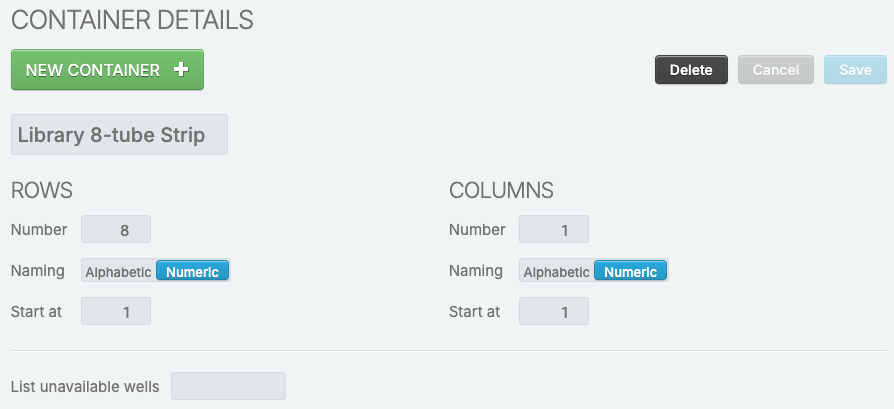
4. Update **Naming** of Rows to Numeric.
5. Update **Start at** of Rows to 1.
**Library 8-tube Strip container**
Repeat the update instructions of Library 2-tube Strip container above for the existing Library 8-tube Strip container.
## 2. Update Global Field (BP Aliquot Volume (ul))
{% hint style="info" %}
The derived sample global field BP Aliquot Volume (ul) is used in Calculate Volumes automation in Dilute and Denature step.
{% endhint %}
1. On the configuration tab, select **Custom Fields**.
2. Select **Global Fields**.
3. Expand **Derived Sample**.
4. Select **BP Aliquot Volume (ul)**.
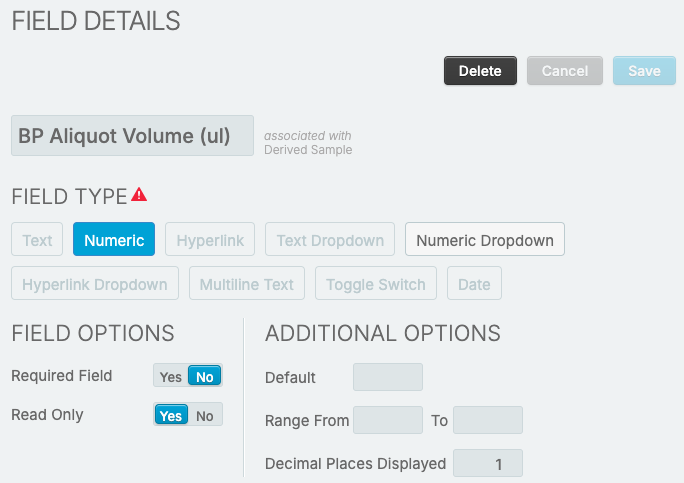
5. Update **Decimal Places Displayed** from 0 to 1.
## 3. Update Automations
There is a minor update of Command Line for Validate Run Setup and Create Planned Run automation, as well as, renaming of several automations to improve readability and provide more clarity of the automation function.
**Update Validate Run Setup and Create Planned Run Automation**
Updates to the Command Line is to improve the error message.
1. On the configuration tab, select **Automation**.
2. Select **Validate Run Setup and Create Planned Run** automation.
3. Update the existing Command Line as follows. Changes are in red.
> bash -l -c "/opt/gls/clarity/bin/java -jar /opt/gls/clarity/extensions/ngs-common/v5/EPP/ngs-extensions.jar -i {stepURI:v2} -u {username} -p {password} \ bash -l -c "/opt/gls/clarity/bin/java -jar /opt/gls/clarity/extensions/ngs-common/v5/EPP/ngs-extensions.jar -i {stepURI:v2} -u {username} -p {password} \ script:evaluateDynamicExpression \ script:evaluateDynamicExpression \ -exp 'if (!step.::Run Name::.matches(::\[a-zA-Z0-9-\_]+\[a-zA-Z0-9-\_. ]\*::)) { fail(::Run Name contains prohibited characters. Please check to make sure Run Name only contains alphanumeric characters, spaces, dashes, periods and underscores. Run Name must start with alphanumeric, a dash or an underscore::); }; if (step.::Run Name::.length() > 255) { fail(::Run Name shall not exceed 255 characters.::); }; if (step.::Index 2 Cycles:: > 0 && step.::Index 1 Cycles:: == 0) { fail(::Index 1 Cycles cannot be zero if Index 2 Cycles is non-zero::); };' \ -exp 'if (!step.::Run Name::.matches(::\[a-zA-Z0-9-\_]+\[a-zA-Z0-9-\_. ]\*::)) { fail(::Run Name contains prohibited characters. Please check to make sure Run Name only contains alphanumeric characters, spaces, dashes, periods and underscores. Run Name must start with alphanumeric, a dash or an underscore::); }; if (step.::Run Name::.length() > 255) { fail(::Run Name shall not exceed 255 characters.::); }; if (step.::Index 2 Cycles:: > 0 && step.::Index 1 Cycles:: == 0) { fail(::Index 1 Cycles cannot be zero if Index 2 Cycles is non-zero::); };' \ -log {compoundOutputFileLuid1} \ -log {compoundOutputFileLuid1} \ -t true \ -t true \ && /opt/gls/clarity/bin/java -jar /opt/gls/clarity/extensions/SIS/SISServices/extensions/automation/novaseqxseries-automation.jar script:generate\_sample\_sheet -i {stepURI:v2} -u {username} -p {password} -c {compoundOutputFileLuid0} -l {compoundOutputFileLuid1}"
**\[Optional] Rename Automations**
1. On the configuration tab, select **Automation**.
2. Rename the automations as specified in the table below.
| **Old Automation Name** | **New Automation Name** | **Used in Step** |
| ------------------------------------------------------------------------------------------------------------------------- | --------------------------------------------------------------------------- | -------------------------------------- |
| Register NovaSeq X RunCompleted and Register Step Completed | Register NovaSeq X Series Sequencing Run Completed | AUTOMATED - Sequencing Run |
| Register Step Started and Register NovaSeq X Run and Register NovaSeq X Run Association and Register NovaSeq X RunStarted | Register NovaSeq X Series Sequencing Run Started | AUTOMATED - Sequencing Run |
| Validate Reagent Labels and Apply Selected ACT to Samples and Set Next Step | Apply Selected ACT to Samples and Set Next Step | Assign Analysis Configuration Template |
| Validate Flowcell Inputs and Validate Analysis Configurations and Register Step Started | Validate Flowcell Inputs, Analysis Configurations and Register Step Started | Load to Library Tube Strip |
| Validate Sample Names and Retrieve Analysis Configuration Template List and Register Step Started | Validate Sample Names, Retrieve ACT List and Register Step Started | Assign Analysis Configuration Template |
## 4. Update Load to Library Tube Strip Step
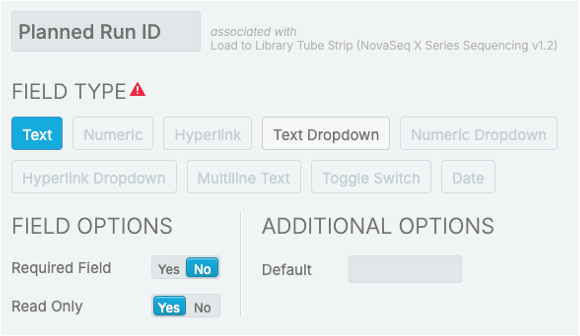
**Rename Cloud Run ID to Planned Run ID**
1. On the configuration tab, select **Custom Fields**.
2. Select **Master Step Fields**
3. Expand **Load to Library Tube Strip (NovaSeq X Series Sequencing v1.1)**.
4. Rename **Cloud Run Id** to **Planned Run ID**.
**Add Instrument Type**
{% hint style="info" %}
New instrument type NovaSeq X is now supported.
{% endhint %}
1. On the configuration tab, select **Custom Fields**.
2. Select **Master Step Fields**.
3. Expand **Load to Library Tube Strip (NovaSeq X Series Sequencing v1.1)**.
4. Add **Instrument Type** field as specified in the image.
5. On the configuration tab, select **Lab Work**.
6. Select **Load to Library Tube Strip (NovaSeq X Series Sequencing v1.1)** step.
7. Under Record Details, add **Instrument Type** to Master Step Fields.
## 5. Update AUTOMATED - Sequencing Run Step
There are configuration updates on the AUTOMATED - Sequencing Run master step and step, as well as updates to the run metrics displayed.
**Update Master Step Configuration**
1. On the configuration tab, select **Lab Work**.
2. Select **AUTOMATED - Sequencing Run (NovaSeq X Series Sequencing v1.1)** master step.
3. Under Step Type, update Derived Sample Generation to **Fixed with 1 Derived Sample generated**.
4. Under Step Type, update Naming Convention to **Lane {InputWellLocation:0,1}**
**Remove Unused RTA Version Master Step Field**
1. On the configuration tab, select **Custom Fields**.
2. Select **Master Step Fields**.
3. Expand **AUTOMATED - Sequencing Run (NovaSeq X Series Sequencing v1.1)**.
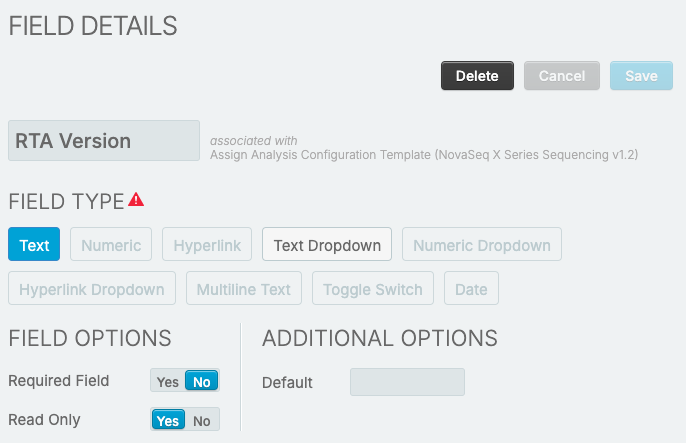
4. Delete **RTA Version**.
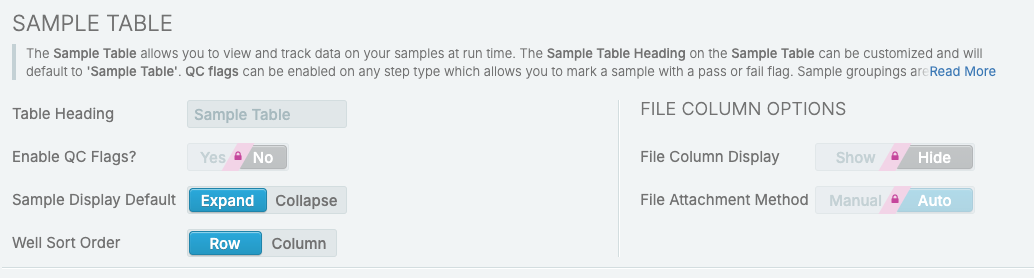
**\[Optional] Expand Sample Table By Default**
1. On the configuration tab, select **Lab Work**.
2. Select **AUTOMATED - Analysis Run (NovaSeq X Series Sequencing v1.1)** step.
3. Select Record Details milestone.
4. Under Sample Table, update **Sample Display Default** to **Expand**.
**Update Run Metrics**
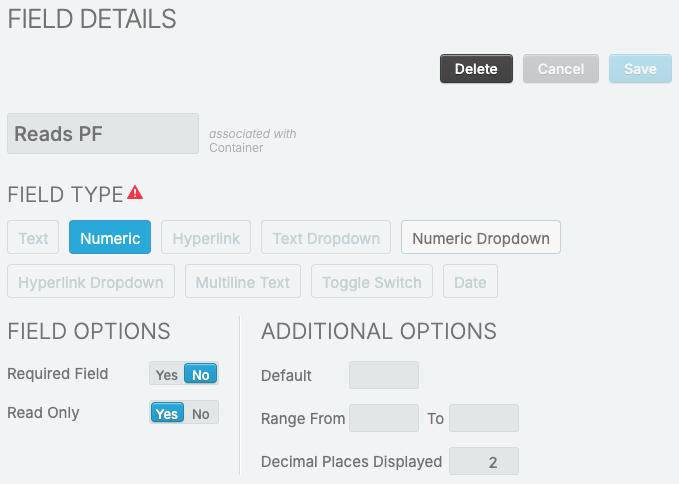
*Reflect Reads PF Metrics at Run Level*
1. On the configuration tab, select **Custom Fields**.
2. Select **Global Fields**.
3. Add **Reads PF** field as specified in the image.
4. Select **Save**.
5. On the configuration tab, select **Lab Work**.
6. Select **AUTOMATED - Sequencing Run (NovaSeq X Series Sequencing v1.1)** step.
7. Under Record Details, remove **Reads PF R1** and **Reads PF R2** from Table Columns.
8. Add **Reads PF** to Table Columns.
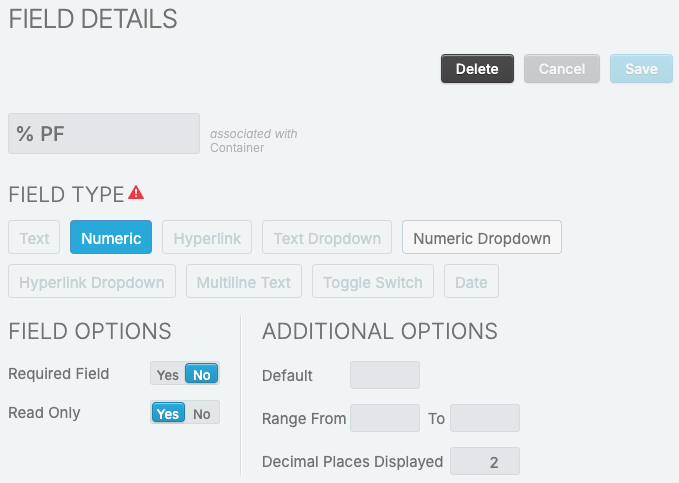
*Reflect % PF Metrics at Run Level*
1. On the configuration tab, select **Custom Fields**.
2. Select **Global Fields**.
3. Add **% PF** field as specified in the image.
4. Select **Save**.
5. On the configuration tab, select **Lab Work**.
6. Select **AUTOMATED - Sequencing Run (NovaSeq X Series Sequencing v1.1)** step.
7. Under **Record Details**, remove **%PF R1** and **%PF R2** from Table Columns.
8. Add **% PF** to Table Columns.
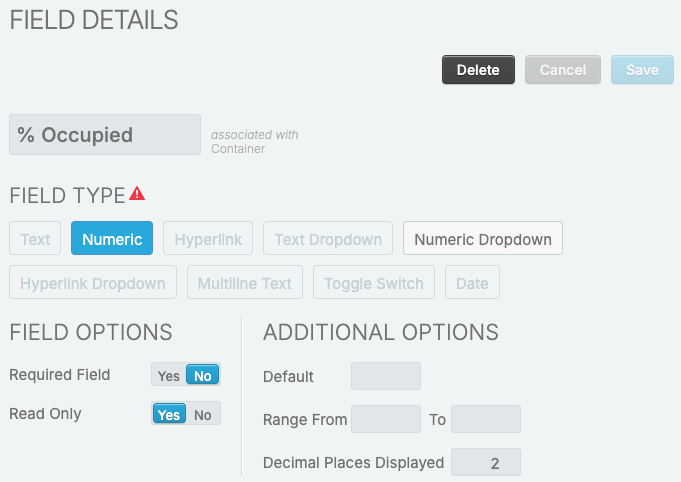
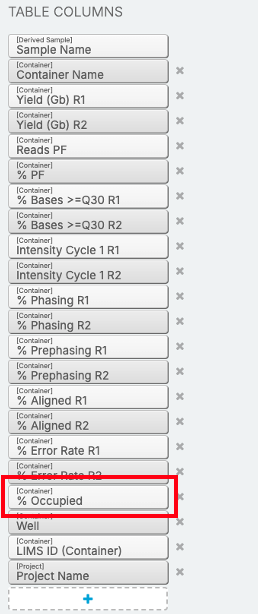
*Add % Occupied*
1. On the configuration tab, select **Custom Fields**.
2. Select **Global Fields**.
3. Expand **Container**.
4. Add **% Occupied** field as specified in the image.
5. On the configuration tab, select **Lab Work**.
6. Select **AUTOMATED - Sequencing Run (NovaSeq X Series Sequencing v1.1)** step.
7. Under Record Details, add **% Occupied** to Table Columns.
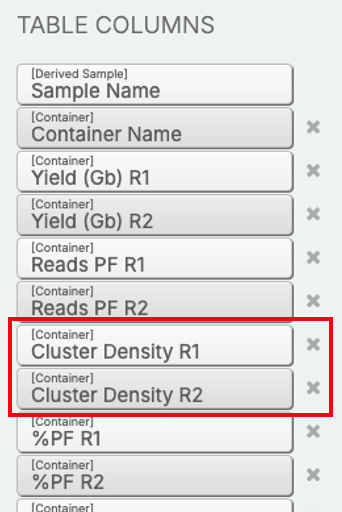
*Remove Cluster Density R1 and Cluster Density R2*
1. On the configuration tab, select **Lab Work**.
2. Select **AUTOMATED - Sequencing Run (NovaSeq X Series Sequencing v1.1)** step.
3. Under Record Details, remove **Cluster Density R1** and **Cluster Density R2** from Table Columns.
4. On the configuration tab, select **Custom Fields**.
5. Select **Global Fields**.
6. Expand **Container**.
7. Delete **Cluster Density R1** and **Cluster Density R2**.
## 6. Update AUTOMATED - Analysis Run Master Step
**Update Master Step Configuration**
1. On the configuration tab, select **Lab Work**.
2. Select **AUTOMATED - Analysis Run (NovaSeq X Series Sequencing v1.1)** master step.
3. Under Step Type, update Naming Convention to **{SubmittedSampleName} {AppliedReagentLabels}**
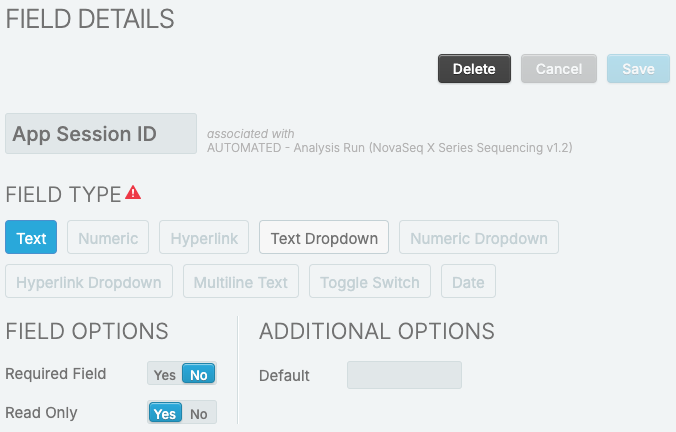
**Rename Library Tube Strip Barcode to App Session ID**
1. On the configuration tab, select **Custom Fields**.
2. Select **Master Step Fields**.
3. Expand **AUTOMATED - Analysis Run (NovaSeq X Series Sequencing v1.1)**.
4. Rename **Library Tube Strip Barcode** to **App Session ID**.
## 7. Upgrade Clarity LIMS Product Analytics Integration (if enabled)
{% hint style="info" %}
The changes are due to updates on container configuration.
{% endhint %}
1. Upgrade to Clarity LIMS Product Analytics Integration v1.4.0
2. Restart the CLPA integration service
systemctl restart clarity_upa
---
# Agent Instructions
This documentation is published with GitBook. GitBook is the documentation platform designed so that both humans and AI agents can read, navigate, and reason over technical content effectively. Learn more at gitbook.com.
## Querying This Documentation
If you need additional information that is not directly available in this page, you can query the documentation dynamically by asking a question.
Perform an HTTP GET request on the current page URL with the `ask` query parameter, and the optional `goal` query parameter:
```
GET https://help.claritylims.illumina.com/instruments-and-integrations/novaseq-x-series/novaseqx/novaseqx-v1.3.0/novaseqx-v1.3.0-manual-upgrade.md?ask=&goal=
```
`ask` is the immediate question: it should be specific, self-contained, and written in natural language.
`goal` is optional and describes the broader end goal you are ultimately trying to accomplish on behalf of the user. GitBook uses it to tailor the answer towards what is most useful for that goal.
The response will contain a direct answer to the question and relevant excerpts and sources from the documentation.
Use this mechanism when the answer is not explicitly present in the current page, you need clarification or additional context, or you want to retrieve related documentation sections.